Find local business leads for your web studio, wherever they are
Name a kind of business and a place. The lead finder brings back every one of them, with or without a website, with their contact details gathered for you, a lead score that says who to call first and a free check of the website they have now.
- Works for businesses anywhere
- Contact details gathered for you
- Export to a spreadsheet
Find local business leads without the hours of searching
Every web studio has the same problem: finding the next client. The usual way to find local business leads is slow. You scroll a map, open listing after listing, copy phone numbers into a spreadsheet, check each website by hand and guess who might want a new one. Most of that time goes on businesses that are already happy or can’t be reached.
The lead finder does the searching for you. Type “cafés” and a town, “dentists” and a city, or “all businesses” in a neighbourhood, and you get a list of every business of that kind in the area, ready to filter, score and contact. It works for businesses anywhere, in any country, so you can prospect close to home or in a market you’d like to break into.
Any kind of business, any area
Search by the kind of business your studio is good at: restaurants, salons, builders, physios, accountants, gyms, shops, or anything else you can name. The search covers the area you name, whether that’s a district, a town or a whole small country, rather than an arbitrary circle on a map that spills into the next place.
If you specialise, this is where it pays off. A studio that knows hospitality can pull every café and bar in three nearby towns in the time it takes to make a coffee.
Contact details, gathered for you
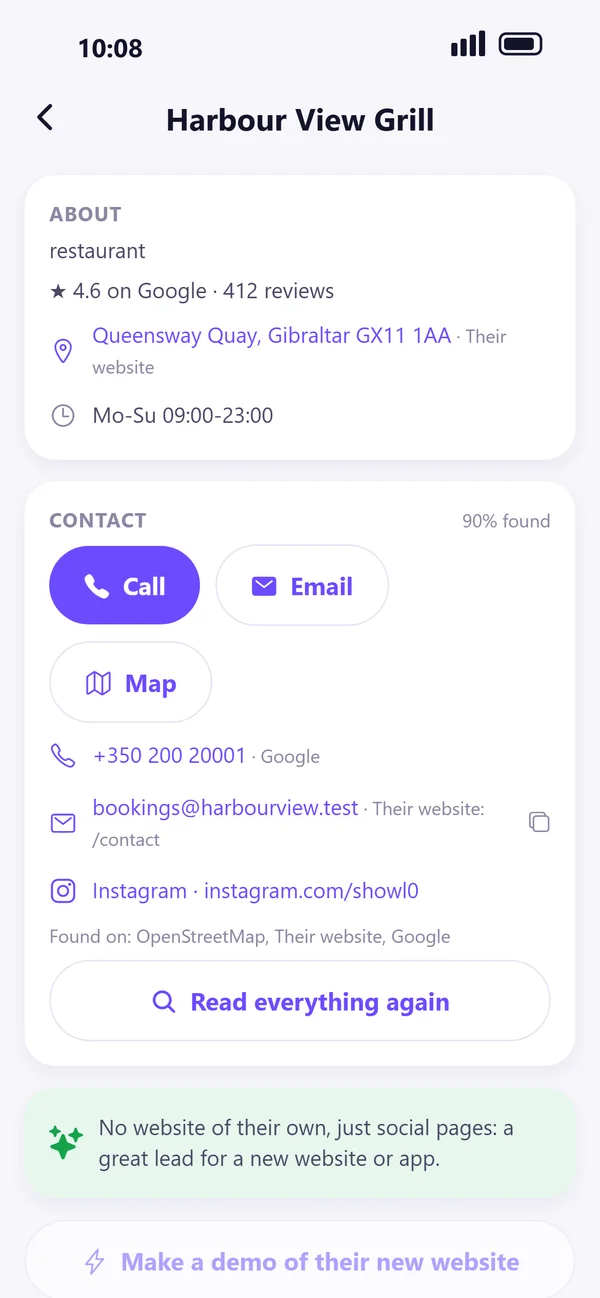
For each business the lead finder collects what’s publicly available: phone numbers, email addresses, Facebook, Instagram and WhatsApp, and other social pages, from public map listings and from the business’s own website. It brings in their logo and photos too, so you recognise them at a glance.
Every detail shows where it was found. That matters when you make contact: you can say “I saw your number on your website” and know it’s true.
It reads modern websites too
Plenty of business websites load their content with scripts, which simple tools can’t read, so the email address or booking link never shows up. The lead finder reads those sites as a visitor would, so it finds the details a quick scan would miss.
Matched with your existing clients
Results are checked against the clients you already have, so you never pitch a new website to someone who is paying you for one. Export the list to a spreadsheet whenever you want to work on it elsewhere.
Call, email or message in one tap
Tap a business to see everything found about it and where each detail came from. Check their website, write a personal pitch, or save them as a lead in your pipeline without retyping a thing.
- Phone, email and social pages together
- Their current website, checked
- Saved to your pipeline in one tap
Know which leads to call first
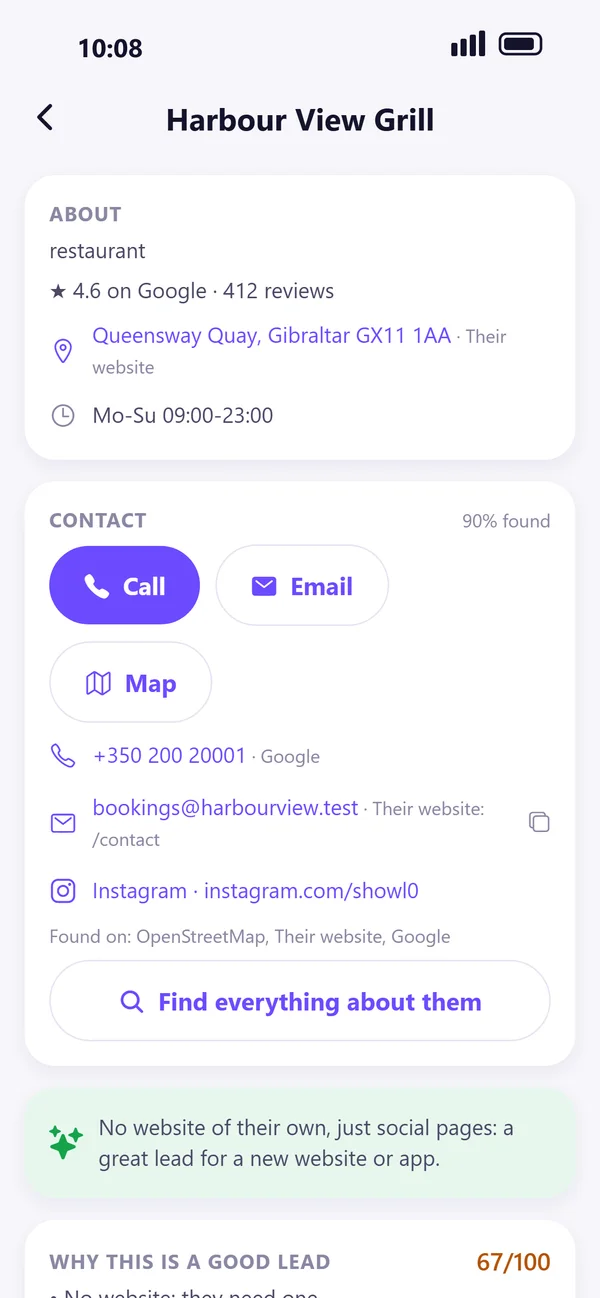
A list of two hundred businesses is only useful if you know where to start. Every lead gets a score with the reasons behind it, so the businesses most likely to need you, and most likely to answer, rise to the top.
What makes a good lead
The best leads have a clear problem and a clear way to reach them. A business with no website at all, or a slow, dated one that scores badly in a check, has an obvious reason to talk to you. A business with an email address and a phone number is one you can actually contact. The lead score weighs both, and shows you why, so you’re not trusting a number you can’t explain.
Filters that matter
Narrow the list to the businesses you can help and reach: no website, has an email, has a phone, on social media. Combine them, for example businesses on social media with no website, which are often busy, well liked and ready for a proper site.
A free website check for any lead
Run our website audit on any lead’s current site: a score out of 100 across nine areas, with the problems that are costing them customers. It turns a cold call into a useful one, because you open with something specific about their business rather than a generic offer. The same check is available to the public among our free website checks, so a prospect can run it again themselves.
Leads to leave alone
A high score isn’t a reason to pitch everyone. Skip businesses whose website is already good, and be wary of chains with a head office that buys centrally. Your time is better spent on owner-run businesses where the person who answers the phone can say yes.
How studios use the lead finder
Search an area
Every café, salon, gym or builder in the place you choose, in one list.
Filter to the best leads
No website, a dated website or a low check score: the businesses that need you most.
Check their website
A free health check shows exactly what is holding their site back.
Send a personal pitch
A pitch written for that business, with their report attached, ready to send.
Follow up in the pipeline
Save them as a lead and move them from contacted to meeting to proposal to won.
Everything you need to make the first contact
Each lead can have a pitch pack: the website check, a redesign concept if you’ve made one, the pitch email and a price, as a page you can share and as a PDF. Add a short video pitch for the leads worth the extra effort, and reminders make sure nobody goes cold.
- Website check and pitch email
- A redesign concept and a price
- A short video pitch
- Follow-up reminders
A pitch that gets a reply
Business owners get offers for new websites every week, and most go straight in the bin because they could have been sent to anyone. A pitch gets read when it’s obviously about that business. The lead finder gives you the material to write one in minutes rather than an hour.
A personal pitch email
The pitch email is written for that business: their name, what they do, what the website check found and what you’d change first. You read it, edit it in your own voice and send it. Short, specific and polite beats long and clever every time.
An instant redesign demo
The most convincing pitch is the prospect’s own business on a better website. From a lead’s current site, the builder can make a quick redesign demo: their name and details on a modern starting point for their industry, shared on a private link. Send it with the website check and the difference speaks for itself: here’s what is holding your website back today, and here’s what it could look like. See website redesign for how a full redesign works once they say yes.
A short video pitch
For the leads you really want, a short video pitch walks the owner through their own website and what you’d improve. It’s harder to ignore than an email, and it shows you took the time to look.
Follow-ups that happen
Most replies come after the second message, not the first. When you save a lead, reminders come up two days later and again a week later, so following up doesn’t depend on your memory during a busy week. The sales tools take it from there, with your pipeline, proposals signed online and invoices.
Prospecting that respects people
The lead finder only uses information businesses have chosen to publish, such as their map listing, their own website and their public social pages. How you use it is up to you, and doing it well protects your studio’s name as much as it wins work.
Know the rules where you prospect
Rules on business-to-business marketing emails, calls and messages differ from country to country, and some are strict about unsolicited contact. Check what applies where your leads are, keep your messages relevant to the business, say who you are, and make it easy to say no. If someone asks you not to contact them again, mark it and respect it. This isn’t legal advice; if you’re unsure, ask someone who knows the law where you work.
Fewer, better messages
Sending one careful pitch to twenty well-chosen businesses works better than a template blasted at five hundred. It also keeps your email address out of spam folders. The lead score and filters are there to help you send less, not more.
From lead to client to monthly income
The lead finder is one tool in the builder for studios, so a lead you find today can become a project, a portal login and a care plan without leaving the platform.
The builder
Plan, preview and build the website, app or game your new client signs up for.
About the builder →Retention tools
Health scores, monthly reports and care plans that keep clients paying.
Retention tools →Questions about finding leads
How do I find local business leads for web design?
Pick the kind of business you build well for and the area you want to work in, then search for every one of them, filter to those with no website or a weak one, and check their current site so you have something specific to say. The lead finder does each of those steps in one place, scores the results and writes a first pitch for you to edit.
Does it work outside my own country?
Yes. The lead finder works for businesses anywhere. Name the kind of business and the place, in any country, and it searches that area. It’s useful for studios that work remotely and want to prospect in a new market, or for those who want every business in their own town before anywhere else.
Where does the information come from?
Only from public sources: map listings that businesses publish about themselves, the business’s own website, and their public social pages. Each detail shows where it was found, so you can check it and mention the source when you get in touch. The lead finder doesn’t buy or sell lists.
How accurate are the contact details?
As accurate as what the business has published. Most details come straight from the business’s own website and listing, which are usually up to date, but some listings are old or incomplete. Because every detail shows its source, you can see at a glance whether a phone number came from their own site or from an older listing.
What is a lead score?
A quick way to see who to contact first. Each business is scored on how likely it is to need you, for example no website or a website that checks badly, and how easy it is to reach, such as having an email and a phone number. The score always comes with the reasons, so you can disagree with it when you know better.
Can I export my leads?
Yes. Export any list to a spreadsheet to work on it elsewhere or share it with someone on your team. Inside the builder, saving a lead to your pipeline keeps everything attached to it, from the website check to the pitch and your follow-up reminders, which is usually the easier way to work.
Is it legal to email businesses I find?
It depends on where the business is and how you contact them. Many countries allow relevant business-to-business emails if you say who you are and make it easy to opt out, while others are stricter. Check the rules that apply to your leads, keep each message specific to the business, and respect anyone who asks not to be contacted again.
Will it pitch businesses that are already my clients?
They’re flagged, not hidden. Results are matched against your existing clients, so you can see at a glance who you already work with and leave them out of a pitch. That also helps the other way round: if a client has a second business you didn’t know about, you’ll spot it.
What does the lead finder cost?
The lead finder is a tool you switch on in the builder, priced from €19.99 a month a month. Writing a personal pitch email uses a few credits, and the estimate is shown before anything runs. Current prices for every studio tool are on our pricing page.
Who can use it?
The lead finder is part of the builder for studios and agencies, which partner studios join by invitation. Email us about your studio and the kind of clients you’d like to find, and we’ll tell you what joining would look like.
Want a steady flow of good leads?
The lead finder is part of the builder for studios and agencies. Tell us about your studio and who you’d like to work for.