Get more Google reviews, without the awkward asking.
Most happy customers would gladly leave a review. They just forget, or do not know where to tap. Our reviews engine asks at the right moment and makes leaving a Google review take seconds, so your stars keep up with how good you really are.
- A public review page and QR code
- Asks customers at the happy moment
- Every new review in your portal
Why Google reviews matter so much for a local business
If you want to get more Google reviews, you are in good company: for most local businesses, reviews are now the deciding factor between being chosen and being scrolled past. When someone searches for a café, a hairdresser or a plumber, Google shows a short list with star ratings beside each name. Before they visit your website, before they call, they have already compared you on those stars and the words underneath.
Reviews do three jobs at once. They persuade new customers, they help your position in local search, and they tell you what people love and what could be better. A business with a steady stream of recent, genuine reviews looks open, busy and trusted. One whose last review was years ago looks uncertain, even when the service is excellent.
The problem is rarely the quality of your work. It is that happy customers leave content and never think about reviewing, while the occasional unhappy one is very motivated. A good system evens that out by making it easy, and natural, for the happy majority to speak up.
Reviews win the choice
When people compare a few businesses side by side, the one with more, newer and warmer reviews usually gets the visit. Specific reviews help most: “they fitted me in the same day” says more than a bare five stars.
That is why we focus on getting more of your real customers to write a line or two, not on chasing a number.
Reviews help you rank locally
Google says it ranks local results on relevance, distance and prominence, and that reviews count towards prominence. More good reviews, and replies to them, help you appear higher on Google Maps and in “near me” searches.
Reviews are one part of a wider picture. Our local SEO and Google Maps page covers the rest: your profile, your local pages and your listings.
Reviews tell you what to fix
Patterns in reviews are free advice. If several people mention slow replies, a confusing booking page or a lovely member of staff, that is worth knowing. Reviews in your portal make those patterns easy to spot.
What our reviews engine does
A public review page
A simple page with your name and logo and one clear button that opens Google’s review box for your business. No hunting for the right listing.
A QR code
Scanned with the customer’s own phone, it goes straight to your review page. Put it on the counter, receipts, menus or the back of a business card.
Asking at the happy moment
A friendly request after a completed visit, order or booking, when the experience is fresh and customers are most likely to say yes.
Reviews in your portal
New reviews appear in your business portal, so you see them quickly and can reply while it still matters.
See the business portal →Printed cards and posters
Our print studio turns your QR code into table cards, flyers and posters that match your brand.
Good reviews, shared
A lovely review can become a thank-you post on your social accounts, shared with the customer’s permission.
Social posts and videos →How to get more Google reviews: timing, ease and a habit
Getting reviews is not about one big push. It is about asking almost every customer, at a good moment, in a way that takes them seconds. Do that every day and reviews arrive steadily, which is exactly what both customers and Google like to see.
These are the principles our reviews engine is built on, and they work whether you run a busy café or a one-person trade business.
Ask while it is fresh
The best time to ask is straight after a good experience: as the haircut is finished, the meal is paid, the job is signed off or the parcel has arrived. A week later the warm feeling has gone and so has the chance.
When the request comes from your website or app, it can be sent after a completed booking or order, so nobody on your team has to remember.
Make it one tap
Every extra step loses people. Telling someone to “search for us on Google and find the review button” loses most of them. A direct link or QR code that opens the review box for your business, ready to type, keeps almost everyone who meant to do it.
Ask in person, back it up in writing
A short, sincere ask from the person who served them is the most effective request there is: “If you were happy today, a Google review really helps a small business like ours.” A QR card on the counter or a link in a follow-up message then makes it easy to act on.
Your team does not need a script. They need a moment to say it and something to point at.
Ask for detail, not just stars
Inviting customers to mention what they had, what they liked or who helped them produces reviews that persuade the next customer, and words that help Google understand what you do. Never tell people what to write, but a gentle prompt helps.
How we set up your reviews engine
A free reviews check
We look at your current rating, how many reviews you have, how recent they are and whether you reply.
Your review page
We make your public review page and connect it to your Google Business Profile, so the button opens the right place.
Your QR code and print
You get your QR code and printable cards or posters in your brand, ready for the counter, the van or the receipt.
The request
We set when and how customers are asked, in your tone of voice and your language. You approve the wording first.
Follow along
New reviews appear in your portal, and your monthly report shows how your rating and review count are moving.
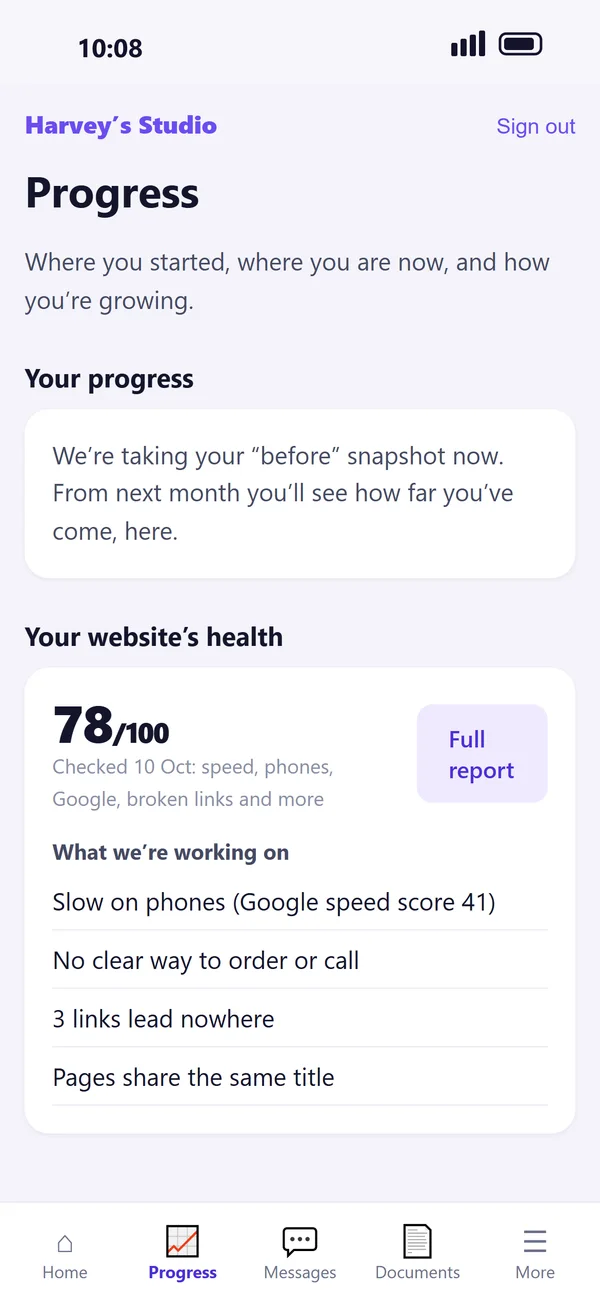
Every review in one place, as it arrives
Your business portal shows your reviews next to your website stats, your listings and your progress. You see what customers are saying without logging in to several places, and you can reply while the review is still fresh.
- New reviews as they come in
- Your rating and review count over time
- Works as an app on your phone, with notifications
Replying to reviews, including the bad ones
Replies are read by far more people than the person who wrote the review. Every future customer who scrolls through your reviews sees how you respond. A short, warm, personal reply to good reviews and a calm, helpful one to bad reviews say a lot about the business behind them.
Google also encourages businesses to reply, and a profile where the owner answers looks cared for. It does not have to take long: a couple of sentences is plenty.
Good reviews
Thank the person by name, mention something specific from what they wrote, and invite them back. Avoid copying the same reply under every review; people notice, and it reads as automatic.
Bad reviews
Reply soon, stay calm and do not argue in public. Thank them for the feedback, apologise for the experience they had, say briefly what you will do and offer a way to talk directly. Many unhappy customers soften when they feel heard, and readers judge the reply more than the complaint.
If a review is fake or breaks Google’s rules, you can report it through your profile. Google decides whether to remove it.
A few bad reviews are not the end
A profile with only perfect scores can look less believable than one with a few honest mixed reviews and thoughtful replies. The answer to a bad review is rarely to hide it; it is to keep earning good ones, so it becomes a small part of a much bigger, positive picture.
What not to do: review mistakes that can backfire
Google has clear rules about reviews, and breaking them can mean reviews removed, warnings on your profile or worse. The safe way is also the simplest: ask real customers for honest reviews, and make it easy. Our reviews engine is designed around that.
Never buy reviews
Paying for reviews, or using services that sell them, breaks Google’s rules and is illegal in a growing number of places. Fake reviews are often spotted and removed, and they can leave your profile looking worse than before.
Do not offer rewards for reviews
Discounts, free items or prize draws in exchange for a review are not allowed on Google. Rewarding loyal customers is great, through a loyalty card or referral programme, but keep it separate from asking for reviews.
Do not review yourself
Reviews from owners, staff or family, or written on a customer’s behalf, count as fake. Let customers write in their own words.
Do not set up a review tablet
Handing customers a shop tablet to leave a review on the spot can get reviews filtered out. A QR code they scan with their own phone is the better way, which is why our engine uses one.
How the reviews engine fits with the rest, and what it costs
Reviews work best as part of how you grow, not on their own. They lift your clicks from search, they make your Google profile stronger and they give you material for social posts. That is why the reviews engine sits alongside our SEO services, local SEO and social media, and reports in the same monthly report.
The reviews engine is one of our growth tools. It can be added on its own or as part of a plan; the pricing page shows the current plans and what each one includes, and any setup is shown in your written plan with its cost before anything is spent.
How quickly reviews come
Once the review page, QR code and requests are in place, new reviews usually start as soon as customers begin to see them. How many you get depends on how many customers you serve and how consistently your team uses it. The habit matters more than any single push.
Built into ordering and bookings
If you take online orders or bookings through a website or app we built, the request can follow a completed order or appointment automatically, which keeps reviews flowing without anyone remembering to ask.
Start with a free check
Our free website checks include a reviews check, which shows your rating, how recent your reviews are and whether you reply, with simple next steps.
Questions about getting more Google reviews
How do I get more Google reviews?
Ask almost every customer, at the moment they are happiest, and make it take seconds. A direct link or QR code that opens your Google review box removes most of the effort. Asking in person and backing it up with a card or follow-up message makes it a habit. Our reviews engine puts all of that in place for you.
How do I get a direct link to my Google reviews?
Your Google Business Profile offers a link that opens the review box for your business. We use it to build your public review page and QR code, so customers land in the right place first time, without searching for your listing.
Is it allowed to ask customers for reviews?
Yes. Google encourages businesses to ask their customers for reviews. What is not allowed is paying for them, offering rewards in exchange, writing them yourself or having staff and family write them. Ask real customers for honest reviews and you are on safe ground.
Can I give a discount for a review?
No. Rewards in exchange for reviews, including discounts, freebies and prize draws, break Google’s rules. You can absolutely reward loyal customers, for example with a loyalty card, as long as it is not tied to leaving a review.
Can you remove a bad review?
Nobody but Google can remove a review. If a review is fake, offensive or breaks Google’s rules, you can report it through your profile and Google decides. For honest negative reviews, the best answer is a calm reply and a steady flow of good reviews from your happy customers.
Should I reply to every review?
Replying to as many as you can is a good habit. Thank people for good reviews, personally rather than with a copied line, and answer bad reviews calmly and helpfully. Future customers read your replies, and a profile where the owner responds looks cared for.
Do reviews help my Google ranking?
Google says reviews are part of how it judges prominence in local search, alongside relevance and distance. More good, recent reviews, with replies, can help you appear higher on Google Maps and in “near me” searches. They also make more people click when they see you.
Do I need a website to use the reviews engine?
No. The review page and QR code work with any business that has a Google Business Profile. If we also run your website or app, requests can be sent after completed orders or bookings, and reviews appear alongside your other stats in the portal.
What about other review sites?
We focus on Google reviews, because that is where most local searches start and where reviews affect your position on the map. If your industry relies on another review site, tell us when we plan your setup and we will look at how best to point customers there too.
Can review requests be in more than one language?
Yes. We write the review page and requests in English, Spanish or both, in your tone of voice, and you approve the wording before anything is sent. Customers can leave their review in whatever language they like.
Ready for more five-star reviews?
Start with a free reviews check. You will see your rating, how recent your reviews are and the simplest way to get more, with no obligation.