Proposal and invoice software for agencies, with the sales pipeline built in
Win the client, send the proposal, get it signed online, take the deposit and bill the monthly services, all next to the project itself. The sales tools are part of the builder we run our own studio on, and they’re made for selling websites, apps and the care that follows.
- Proposals your clients sign online
- Deposits, invoices and monthly billing
- A pipeline that reminds you to follow up
Why proposal and invoice software for agencies belongs next to your projects
Most studios sell with one tool, build with another and invoice with a third. The proposal says one thing, the project grows into something else, and the invoice is typed up from memory at the end of the month. Proposal and invoice software for agencies works best when it knows what you’re actually building, and that’s why ours sits inside the builder rather than beside it.
When a lead, a proposal, a project and an invoice are all the same record, nothing gets lost between them. The price in the proposal comes from your own price list, the signed proposal starts the project, the deposit is requested straight away, and the monthly services the client chose are billed every month without you remembering to do it.
The hidden cost of separate tools
Every time you copy a client’s name, a price or a scope from one tool to another, there’s a chance to get it wrong, and a little time lost. Across a year that adds up to days of admin, a few invoices sent late and the occasional piece of work that was never billed at all. Keeping sales and projects together removes the copying, not just the tools.
Made for how studios earn
A web studio rarely sells one simple thing. There’s the build, paid as a deposit and a balance; then hosting, care and growth services paid monthly; then change requests along the way. The sales tools are shaped around that mix, so a proposal can include a one-off build and a monthly plan, and the invoices follow on their own.
Where it fits
The sales tools pick up where the lead finder leaves off, and hand over to the builder once a proposal is signed. After launch, the retention tools help you keep the client and grow what they spend with you.
A sales pipeline with follow-ups that actually happen
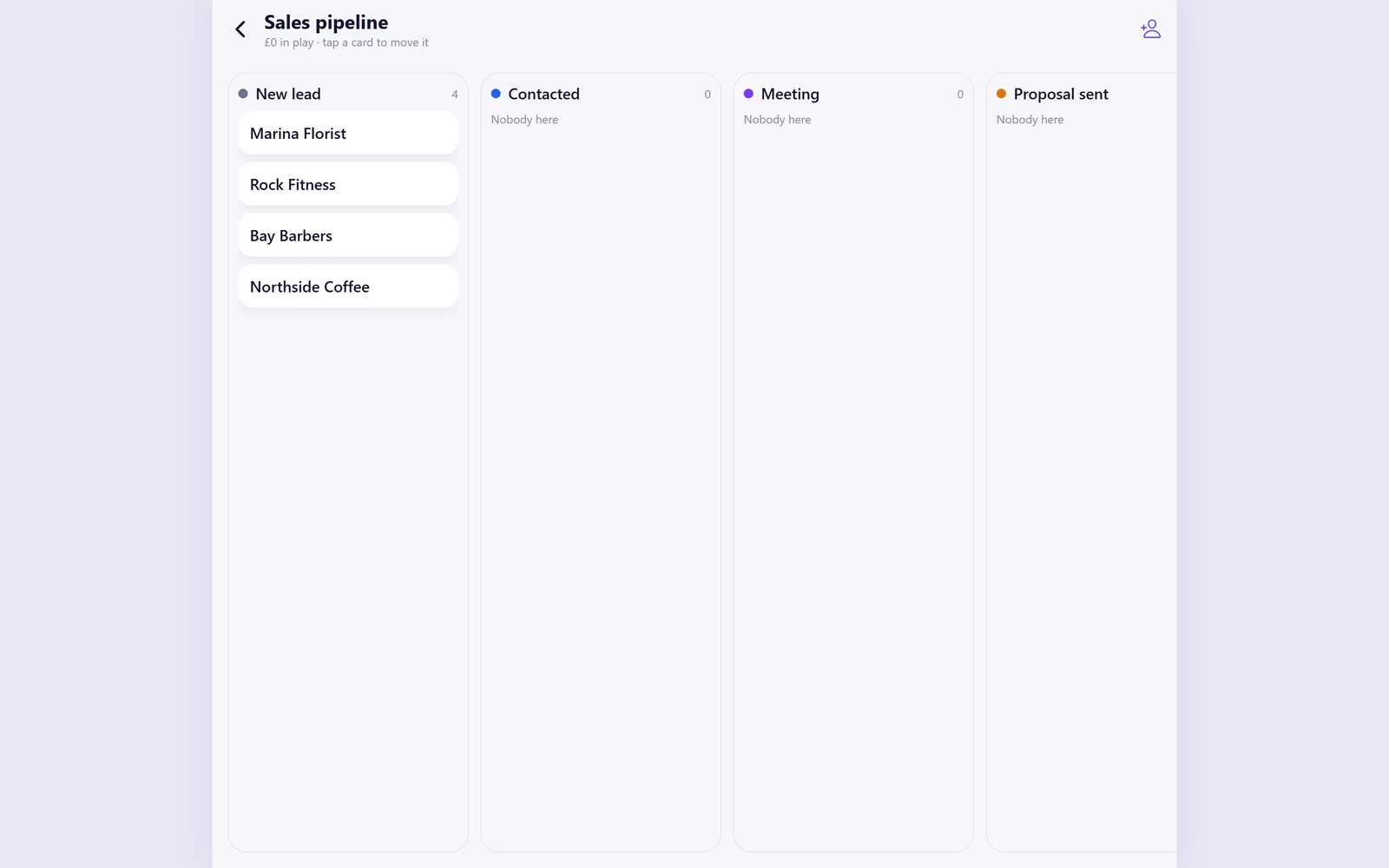
Leads go cold for one reason more than any other: nobody followed up. The sales pipeline shows every potential client as a card, in the stage they’ve reached, with a value and a next step, so you can see at a glance what’s waiting on you.
Clear stages
New lead, contacted, meeting, proposal sent, then won or lost. Simple enough that you’ll keep it up to date, detailed enough to tell you where your next month’s income is coming from.
Cards that move themselves
As things happen, the cards move on their own, so the board reflects reality without you dragging cards around after every email. A sent proposal or a signed one shows up where it should.
Values and next steps
Each card carries what the work is worth and what happens next. Add up the cards at proposal stage and you know what’s realistically coming; look at the next steps and you know what to do this morning.
Follow-up reminders
When you save a lead, reminders come up two days later and again a week later. A polite second message is often the one that gets the reply, and the reminder means it’s sent while the first one is still remembered.
From first contact to signed client
Every lead you find or add lands in the pipeline with everything you know about them attached: their website check, the pitch you sent and the proposal they’re reading.
- New lead to won, at a glance
- Values on every card
- Reminders so nobody goes cold
Pitch packs and short video pitches
The first message decides whether there’s a second conversation. A pitch that shows you’ve looked at the business, and that you know what you’d do about it, gets a very different reception from a generic offer.
The pitch pack
For any lead, put together a pitch pack: a check of their current website with its score and problems, a redesign concept if you’ve made one, a pitch email written for that business and a price. It works as a page you can share and as a PDF, so it’s just as easy to send by email as to leave behind after a meeting.
Short video pitches
For the clients you really want, a short video pitch walks the owner through their own website and what you’d change. Video is harder to ignore than text and shows effort without taking a meeting. Keep it short, mention one or two specific problems and end with a single, easy next step.
A redesign demo to show, not tell
From a prospect’s current website, the builder can make a quick redesign demo on a modern starting point for their industry, shared on a private link. Seeing their own name on a better site makes the conversation about when, not whether. Our page on website redesign explains how the full redesign then works.
Proposals your clients can sign online
A proposal should be easy to read, hard to misunderstand and quick to say yes to. Proposals in the builder are priced from your own price list, can be written for you if you’d like a first draft, and are signed by the client online in their own portal, with no printing, scanning or chasing.
Priced from your price list
Set your prices once: a website, a WordPress site, an app, monthly care, hosting, growth services, and whatever else you sell. Each proposal draws on that list, so your pricing stays consistent between clients and you never quote last year’s price by accident. You can always adjust a line for a particular job.
A first draft written for you
If you’d rather not start from a blank page, ask for a draft based on the client and the project. Read it, change what doesn’t sound like you, and send it. You stay in charge of what you promise.
Signed online, in their portal
Your client opens the proposal in their own business portal, reads it on their phone or computer and signs it there. The signed proposal is kept with their documents, so both of you can find exactly what was agreed months later.
From the plan to the proposal
For a website or app, the builder’s written plan already lists every page or screen and the cost of each step. That makes the proposal easier to write and easier to trust: the client can see what each part of the price pays for.
What a good web design proposal includes
The pages or screens included, and what each one does. What the client needs to provide, such as photos, wording and logins, and by when. How many rounds of changes are included and how extra changes are priced. The timeline, in stages rather than one date. What happens after launch: hosting, care and support, and what they cost each month. Payment terms: the deposit, the balance and when monthly billing starts.
Most disputes come from the things a proposal didn’t say. Writing them down is a kindness to both sides.
Get paid online, from a phone
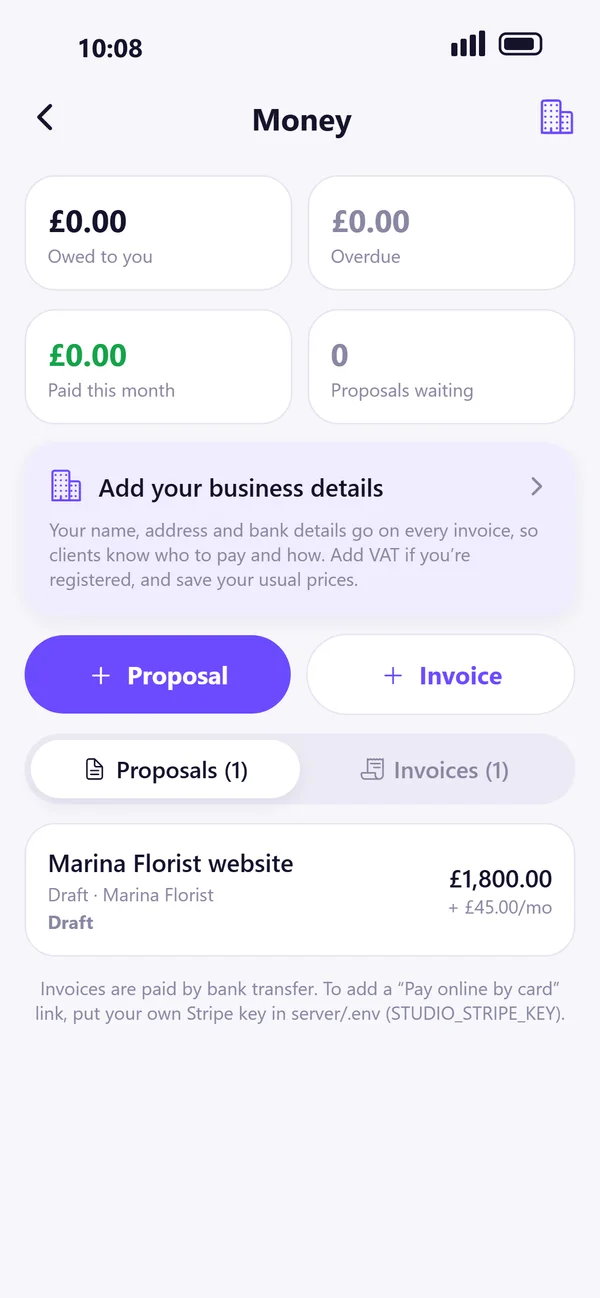
Clients open the invoice and pay online in a few taps. Reminders go out when something is overdue, so you don’t have to write the awkward email yourself.
- Pay online from any phone
- Reminders when it’s overdue
- Paid and owed, always up to date
Invoices, deposits and monthly billing
Getting paid on time is as much about systems as about clients. Invoicing that follows the project means the right invoice goes out at the right moment, without you sitting down to do the books.
A deposit, then the balance
Once a proposal is signed, take a deposit before work starts and invoice the balance when it’s done. A deposit protects your time and tells you the client is serious.
Monthly services, billed automatically
Hosting, website care and growth services are billed every month without you creating each invoice. This is the steady income that carries a studio through quiet months, and it’s the easiest kind to lose track of when it’s done by hand.
Reminders when something is overdue
Overdue invoices get reminders, so chasing payment isn’t a job you dread. You can see at a glance what has been paid and what is still owed.
Change requests with a price
When a client asks for a change in their portal, it reaches you ready to price. Approve it with its price and the client knows what it costs before you start, which keeps small extras from turning into unpaid work.
Ready for your accountant
Download your invoices and payments as a file for your accountant or your bookkeeping software.
From lead to monthly income
Find or add a lead
From the lead finder, a referral or a phone call. It goes straight into the pipeline.
Pitch
Send a pitch pack, a redesign demo or a short video pitch. Reminders keep the follow-ups going.
Propose
A proposal priced from your price list, sent to the client’s portal.
Signed online
The client signs, the deposit is requested and the project begins.
Build and launch
The balance is invoiced when the work is done and launched.
Bill every month
Hosting, care and growth services are billed automatically from then on.
Know what your studio really earns
Revenue isn’t profit, and a busy month isn’t always a good one. The builder shows you the business behind the projects, so you can price the next job with your eyes open.
A business dashboard
Monthly income, what has been paid and what is owed, your clients, your pipeline and your money over the last six months, on one screen. Open it on a Monday and you know where things stand.
Time and margin tracking
Track time on each project and see your real rate per hour once building costs are taken off. Some projects that felt profitable turn out not to be, and some small ones are your best work per hour. Either way, you’ll quote the next one better.
Common pricing mistakes studios make
Starting work without a deposit. Doing small changes for free until they add up to a week. Quoting the build and forgetting the months after it, when hosting, care and reports could be paying the bills. Pricing every client from scratch, so similar jobs end up at very different prices. A price list, priced change requests and monthly services fix most of these on their own.
Questions about proposals, invoices and the pipeline
What is the best proposal and invoice software for agencies?
The best one is the one that knows what you’re building. Separate tools make you copy names, prices and scope from one place to another. Ours sits inside the builder, so a lead becomes a proposal, a signed proposal becomes a project, and the deposit, balance and monthly services are invoiced from the same record. That matters most for studios that sell builds and monthly services together.
How do clients sign a proposal online?
They open it in their own business portal, on a phone or a computer, read it and sign it there. There’s no printing or scanning. The signed proposal is kept with their documents in the portal, so both of you can look back at exactly what was agreed, and the project can start straight away.
Can I take a deposit before starting work?
Yes. Once a proposal is signed, request a deposit before the work begins, then invoice the balance when it’s done. Taking a deposit is one of the simplest ways to protect a small studio: it confirms the client is committed and covers your early time if plans change.
Can it bill monthly care and hosting automatically?
Yes. The monthly services a client signs up for, such as hosting, care plans and growth services, are billed every month automatically. You don’t create each invoice by hand, and reminders go out if one becomes overdue. It’s the part of a studio’s income that’s easiest to forget and most valuable to keep.
How do clients pay my invoices?
Online. Your client opens the invoice and pays in a few taps from their phone or computer. You can see what has been paid and what is still owed on your dashboard, and overdue invoices get reminders so you don’t have to chase by hand.
Can I use my own prices?
Always. You set your own price list, and proposals are priced from it. You decide what a website, an app, a care plan or a change request costs your clients; the builder never sets your prices. You can adjust any line on a particular proposal when a job needs it.
What stages does the sales pipeline have?
New lead, contacted, meeting, proposal sent, and then won or lost. Each card shows what the work is worth and the next step. Cards move on by themselves as things happen, and reminders come up two days and a week after you save a lead, so following up doesn’t rely on memory.
What is a pitch pack?
A single page, also available as a PDF, that you send to a prospect: a check of their current website with its score and the problems found, a redesign concept if you’ve made one, a pitch email written for their business and a price. It gives the owner everything they need to say yes in one place.
Can I send my invoices to my accountant?
Yes. Download your invoices and payments as a file to give to your accountant or bring into your bookkeeping software. Together with the dashboard and the time and margin tracking, it means you always know what came in, what’s owed and what each project really earned.
What do the sales tools cost?
The sales tools are part of the builder for studios and agencies, which partner studios join by invitation. Each tool you switch on has a monthly price, and writing with help, such as a first-draft proposal or a pitch email, uses credits with the estimate shown first. Current prices are on our pricing page.
The rest of the studio toolkit
Lead finder
Every business of a kind in an area, scored, with contact details and a website check.
Find leads →Retention tools
Health scores, monthly reports, care plans and upsell ideas for every client.
Keep clients →Spend less time on admin and more on building
The sales tools are part of the builder for studios and agencies. Tell us about your studio and how you sell today.